 By Jim Hartman
You can reduce file size by compressing the file, resizing images, removing unnecessary content, or saving it in a more efficient format.

Imagine you are working on an important project and have created an excellent final draft. When it comes to sharing that file, you get the message: “The file is too large to upload.”
It can be annoying for anyone when you can’t send your files, such as PDFs, images, videos, PowerPoint presentations, ZIP files, and more.
Whenever that happens, you should try reducing the file size. Yes, there are many ways to reduce the file size without compromising the quality.
If you’re wondering how to reduce file size, this guide covers the most useful methods to compress videos, PDFs, images, and other files for faster uploads.
Now, you might ask why my file is too large. Well, there could be a few reasons for that.
Reducing the file size offers a number of benefits. So, it’s a no-brainer for anyone to reduce the file size before sharing it online.
Here is the list of benefits.
How to reduce PDF file size? This question has troubled many who aren’t as tech-savvy as others.
If you fall in that category, there is nothing to worry about. Here, we will list ways you can use to reduce PDF file size.
You can always rely on online PDF compression tools. These are the most common solutions to the “file is too large” error.
Here are the steps.
Open an online PDF compression tool.
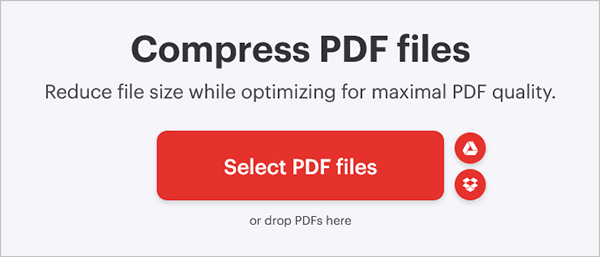
Upload your PDF by clicking on “Select PDF files”
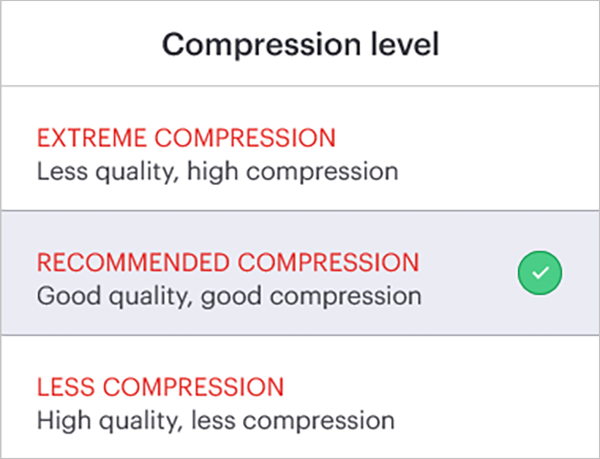
Now choose the compression level
Then click on the Compress PDF button

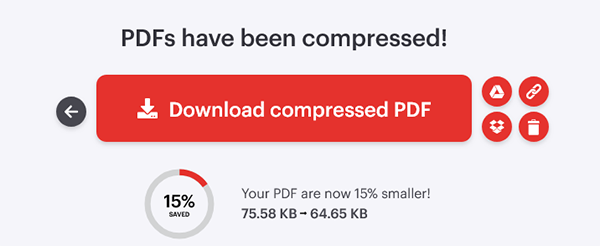
Click on the Download button once the process is completed.
Apart from online tools, you can also use various software for compression. However, in our opinion, using online tools is better for everything.
Some unnecessary elements in a file may also lead to a heavy file size. If that has happened to you, you can try removing those elements from the file to make it lighter.
Here is the list of unnecessary elements.
People using the Pro version of Adobe Acrobat Reader can directly compress PDFs from the reader itself.
Here are the steps.
To reduce the image file size, you can go either of these three routes.
If the file is too large for uploading, you can always try lowering its width and height. This will definitely reduce the file size to an appropriate amount
The best app to do that is Microsoft Paint.
Note: Always maintain the aspect ratio of the image when resizing its dimensions.
How to decrease file size? Compression works wonders when you are trying to decrease the image size. The best part is that you can easily do that using online image compression tools.
If you want to upload images online, convert them to modern formats like WebP or AVIF.
How to make a file size smaller? Making a video file smaller might prove to be challenging, as the quality depends on it.
Well, there are a few things you can try to reduce video file size.
Apart from all these things, there are also online video compression software that can come in handy.
It is all right if you use all these things. However, you must maintain an acceptable video quality. Otherwise, what is the point of all this if you’re unable to recognize your own video?
To reduce the file size of Word, Excel, and PowerPoint documents, you can use the following methods.
So, how do you make a file smaller to upload?
Well, if you follow our guidelines listed here, you would certainly be able to make your file smaller for upload.
How to decrease file size without losing quality? For that, you must use lossless compression.
Here is how you can make a file size smaller on different devices.
You can use the built-in ZIP utility in Windows. For that,
After that, you can share your compressed folder or document through the internet with ease.
Just like Windows, Mac also comes with built-in compression tools. Similar to Windows, you have to:
In Android, the Files app can be used for compression. For that,
Just like Android, iOS also comes with native file compression. To do that,
So, how to minimize file size? If you want to keep your file sizes small, here are some tips to remember.
Knowing how to reduce file size can save storage space, speed up uploads, and make sharing files much more convenient.
File compression solves everything, which makes these files ready for sharing, storage, and uploads. However, you must know that different types require different optimization techniques. We’ve listed all of them in this article.
So, read them carefully and solve your problem. Also, if you are working with important files, we would encourage you to keep the original file before compressing.
You can reduce file size by compressing the file, resizing images, removing unnecessary content, or saving it in a more efficient format.
Compress the file, optimize images or videos, remove unnecessary elements, and ensure the file meets the platform’s upload size requirements.
Yes. Lossless compression and optimized export settings can significantly reduce file size while preserving most or all of the original quality.
Some file types, such as already compressed videos or images, have limited potential for additional size reduction. You may need to resize or re-encode them.
Most file types—including PDFs, images, videos, Word documents, Excel files, PowerPoint presentations, and folders—can be compressed to reduce their size.
How to convert HEIC to JPG? Every Apple user asks this question when they are unable to send the captured…
October 7, 2026
Digitizing documents used to be tough; now it’s easier with scanning apps, smartphones, and digital scanners that can digitize documents…
September 18, 2026
More often than not, PDFs become too large because they contain high-resolution images, scanned pages, embedded fonts, hidden data, and…
September 1, 2026
In this fast-moving world. Automation is the key to enhancing efficiency, accuracy, and speed of workflow, without any human intervention.…
September 1, 2026
Imagine you are working on an important project and have created an excellent final draft. When it comes to sharing…
August 24, 2026
Starting a business today feels like a stressful practice and causes a mess in your mind while making decisions. Evaluating…
July 6, 2026 By Tina Brown